
• Home
  • Documentations
    • Phlox WordPress Theme
    • Phlox Pro WordPress Theme
    • Master Slider jQuery
    • Master Slider WordPress Pro
    • Master Slider WordPress Free
    • LOTUS WordPress Theme
  • Video Tutorials
    • Phlox ? Video Tutorials
    • Master Slider WP Pro
    • Master Slider WP Free
    • Master Slider jQuery
    • Lotus ? Video Tutorials
  • FAQ
    • General Questions
    • LOTUS WordPress Theme
    • Master Slider jQuery
    • Master Slider WordPress
    • CUTE Slider
  • Knowledge base
    • Beginners
    • Advanced Techniques
    • WordPress plugins
  • Support Forum
    • Login Or Register
    • Support Forum
    • Support Policy
Averta Support Center
  • Home
  • Documentations
    • Phlox WordPress Theme
    • Phlox Pro WordPress Theme
    • Master Slider jQuery
    • Master Slider WordPress Pro
    • Master Slider WordPress Free
    • LOTUS WordPress Theme
  • Video Tutorials
    • Phlox ? Video Tutorials
    • Master Slider WP Pro
    • Master Slider WP Free
    • Master Slider jQuery
    • Lotus ? Video Tutorials
  • FAQ
    • General Questions
    • LOTUS WordPress Theme
    • Master Slider jQuery
    • Master Slider WordPress
    • CUTE Slider
  • Knowledge base
    • Beginners
    • Advanced Techniques
    • WordPress plugins
  • Support Forum
    • Login Or Register
    • Support Forum
    • Support Policy

Looking for the answer

  • Home
  • Phlox WordPress Theme
  • Design and Layout
  • Adding a Frame for Your Website

Adding a Frame for Your Website


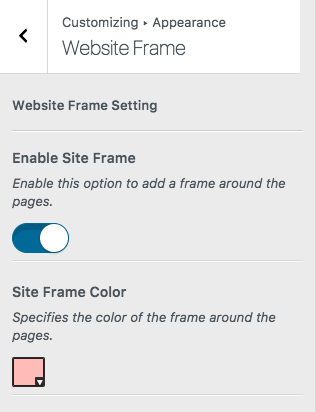
There is an option available, which allows you to add a Frame to your website. The color of the frame is customizable.

Follow the below steps to add and customize this frame:

  1. Go to your WordPress Admin Panel
  2. Click?Appearance on the Dashboard
  3. Then click?Customize
  4. Go to?Appearance > Website Frame
  5. Enable site frame

You can check this out on Journey Demo.

Video Tutorial

Was this information helpful?

Submit
Previuos Step
Related articles list
Create New Support Ticket

Maybe You're Searching For These

Upgrading from Phlox Free to Phlox Pro
Changing Slider Skin
Importing Pages and Sections with Phlox Template Kits and Elementor
Creating a simple slider in quick steps
Using Sample Sliders
Phlox Text Element
Organizing Blog with Category and Tag
Understanding Licenses Information
Copyright © 2017 Averta. All rights reserved.